Felhasználói Kézikönyv
Tranzakciók rögzítése
Tranzakciók rögzítése
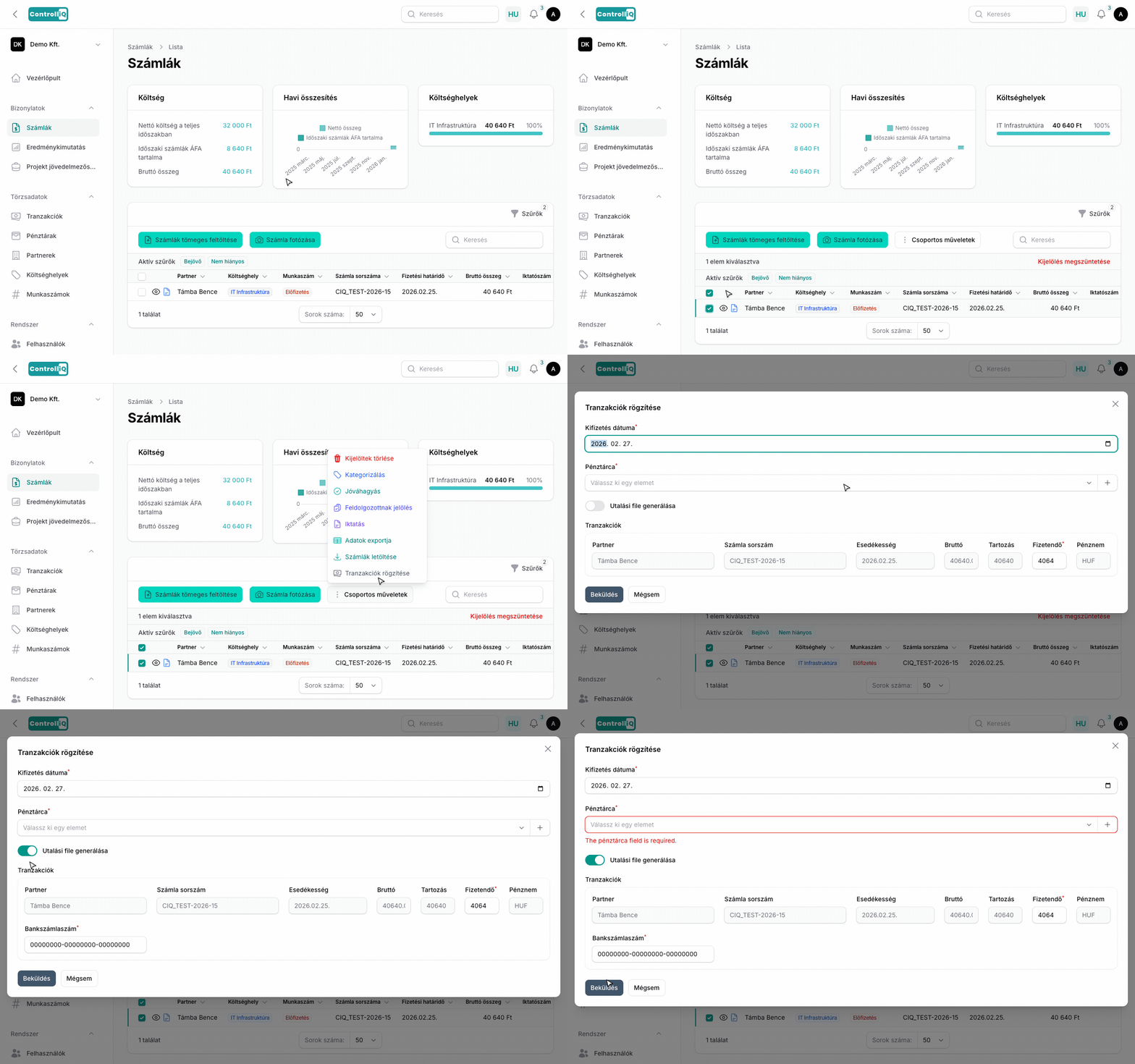
A kifizetéseket a számlák listájából és a pénzügyi tételek listájából is rögzítheted a csoportos műveletek közül a „Tranzakció rögzítése" / „Fizetés rögzítése" funkcióval.
Hogyan működik?
- Kifizetés dátuma — Alapértelmezetten a mai nap.
- Pénztárca kiválasztása — Melyik pénztárból történik a kifizetés.
- Banki utalási fájl generálása — (csak számláknál) Bekapcsolva a rendszer a pénztárhoz beállított bank formátumában letölthető utalási fájlt generál.
Fizethető típus
A tranzakciók táblázat tartalmaz egy fizethető típus oszlopot, amely megmutatja, hogy a tranzakció számlához vagy pénzügyi tételhez kapcsolódik, így könnyen azonosítható a forrás.
Csoportos kifizetés
Egyszerre több tételt is kijelölhetsz és egy lépésben rögzítheted a kifizetésüket. Számla kifizetések esetén a banki utalási fájl az összes kijelölt számla utalási adatait tartalmazza.
Banki megerősítés később
Az itt rögzített kifizetés (pl. a generált utalási fájllal együtt) még nem banki konfirmált. Amikor később feltöltöd a havi bankszámlakivonatot, az egyeztetés felismeri a rögzített tranzakciót, és megerősíti azt duplikáció helyett: átkerül a kivonat pénztárcájába, dátuma pedig a tényleges banki könyvelési naphoz igazodik.