Felhasználói Kézikönyv
Partner áttekintés
Partnertörzs
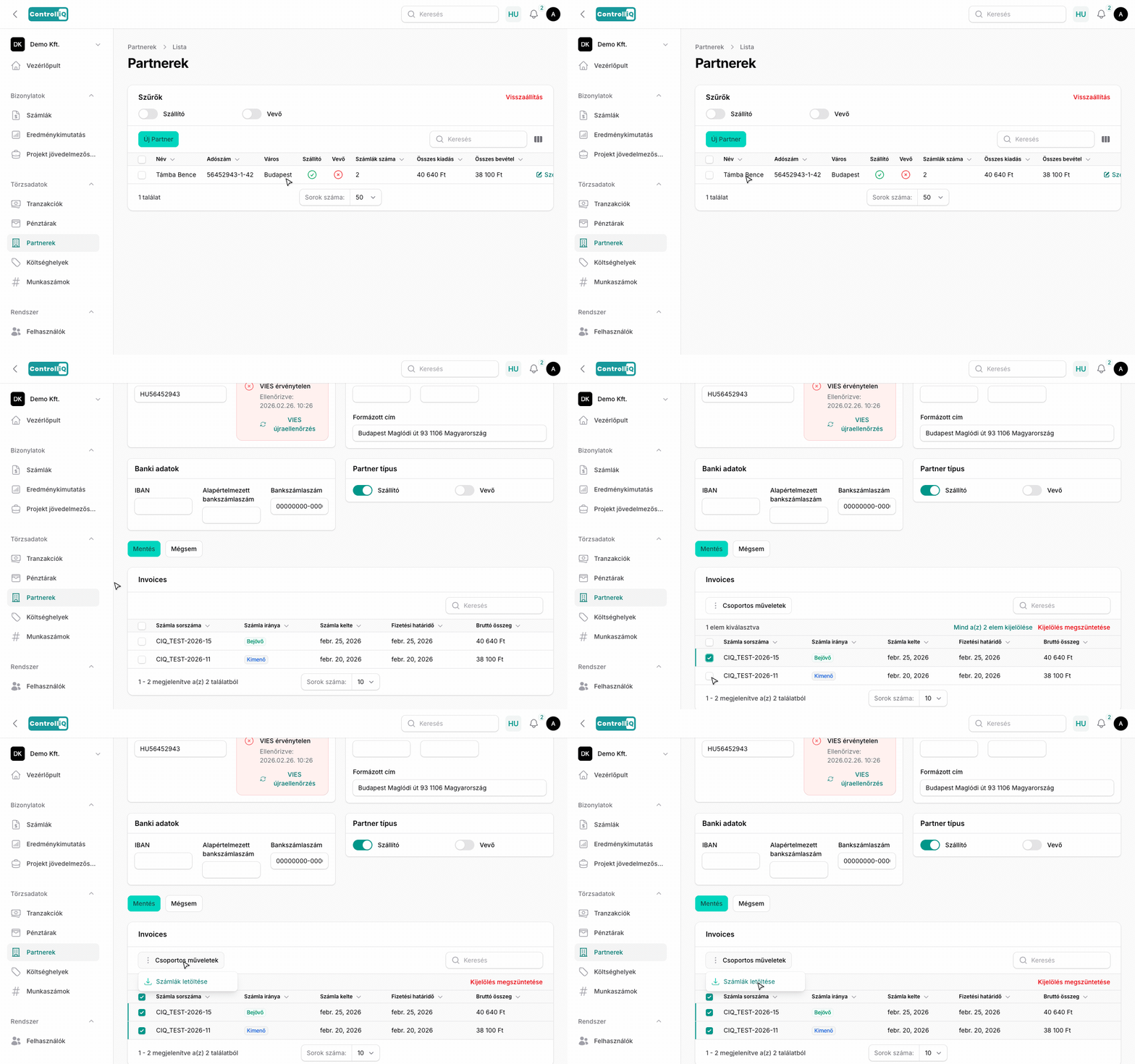
A Törzsadatok > Partnerek menüpontban találod az összes szállító és vevő adatait. A partnertörzs automatikusan bővül, ahogy új számlák érkeznek.
Partner lista (táblázat)
A partnerek listájában a következő oszlopok láthatók:
A lista szűrhető szállító és vevő típus szerint.
Partner szerkesztés
A partner szerkesztési oldalán a következő adatok módosíthatók:
Partnerhez tartozó számlák
A partner szerkesztési oldalán alul megjelennek a partnerhez tartozó összes számlák táblázatban (számlaszám, irány, kiállítás dátuma, fizetési határidő, bruttó összeg). A számlákra kattintva közvetlenül a számla szerkesztési oldalára jutsz. A számlákat kijelölheted, és csoportos műveletként egyszerre letöltheted őket ZIP fájlban.
Automatikus partnerlétrehozás
Amikor egy új partnertől érkezik számla (NAV szinkron, Billingo, email import vagy manuális feltöltés), a rendszer automatikusan létrehozza a partnert a partnertörzsben.