KÉZIKÖNYV
Felhasználói Kézikönyv
Költséghelyek és Munkaszámok / Import/Export
Import/Export
Költséghelyek és munkaszámok importálása/exportálása
Ha sok költséghelyed vagy munkaszámod van, lehetőséged van ezek tömeges importálására és exportálására.
Import
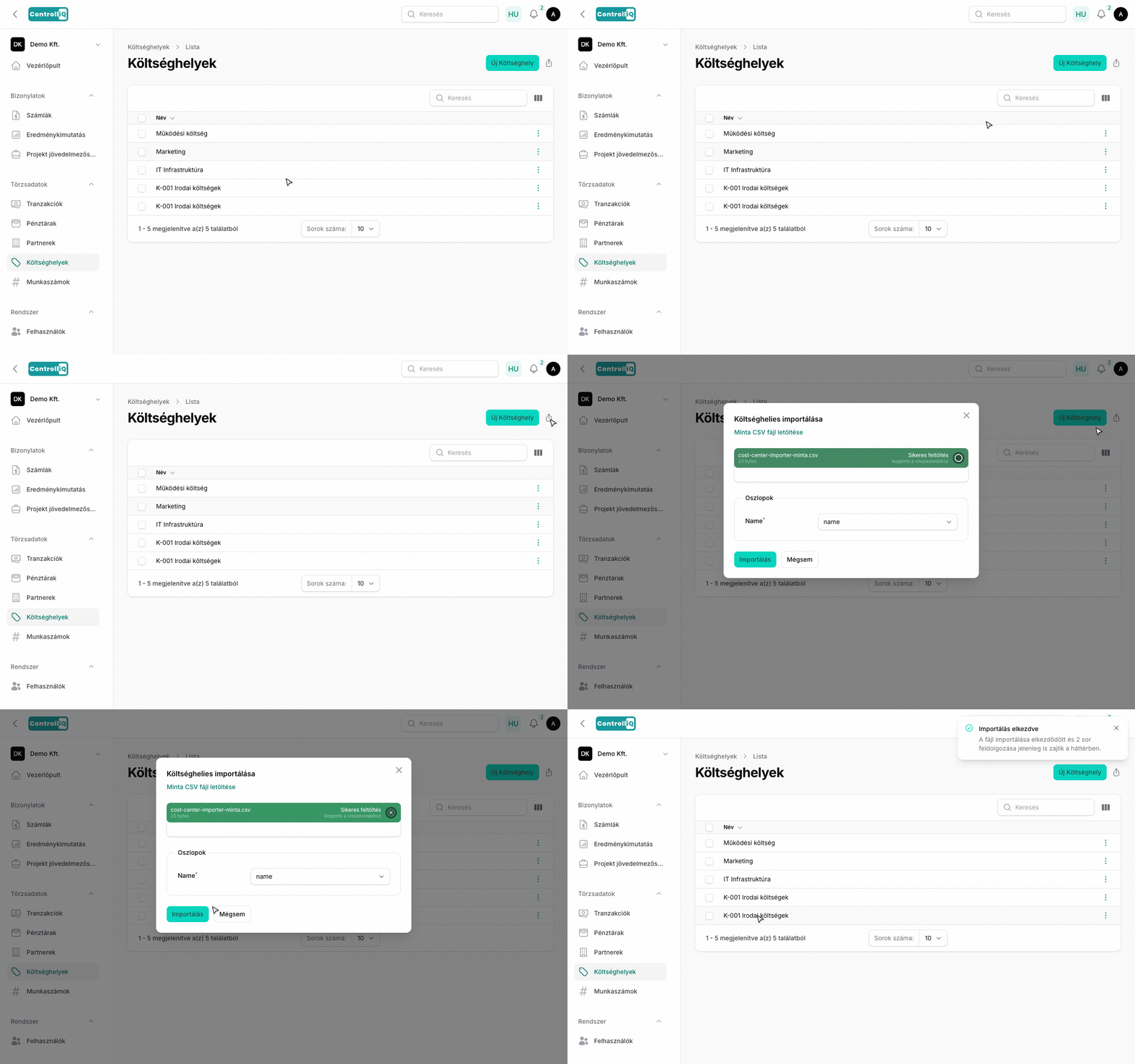
Költséghelyeket és munkaszámokat CSV fájlból importálhatsz. A CSV fájlban egy name oszlopnak kell lennie, amely a megnevezéseket tartalmazza.
Az importálás a költséghelyek vagy munkaszámok listájában az import gombra kattintva indítható. A feltöltött fájl feldolgozása után a rendszer megjeleníti az importálandó tételeket, ahol ellenőrizheted és jóváhagyhatod őket.
Export
A meglévő költséghelyeket és munkaszámokat Excel (XLSX) vagy CSV formátumban exportálhatod, például más rendszerbe való átvitelhez vagy archiváláshoz. Az exportáláshoz jelöld ki a kívánt tételeket, majd válaszd a csoportos műveletekből az exportálást.