KÉZIKÖNYV
Felhasználói Kézikönyv
Költséghelyek és Munkaszámok / Költséghelyek létrehozása
Költséghelyek létrehozása
Költséghelyek
A költséghelyek segítenek a kiadások és bevételek kategorizálásában. Minden céghez egyedi költséghely-struktúrát hozhatsz létre.
Költséghely létrehozása
1
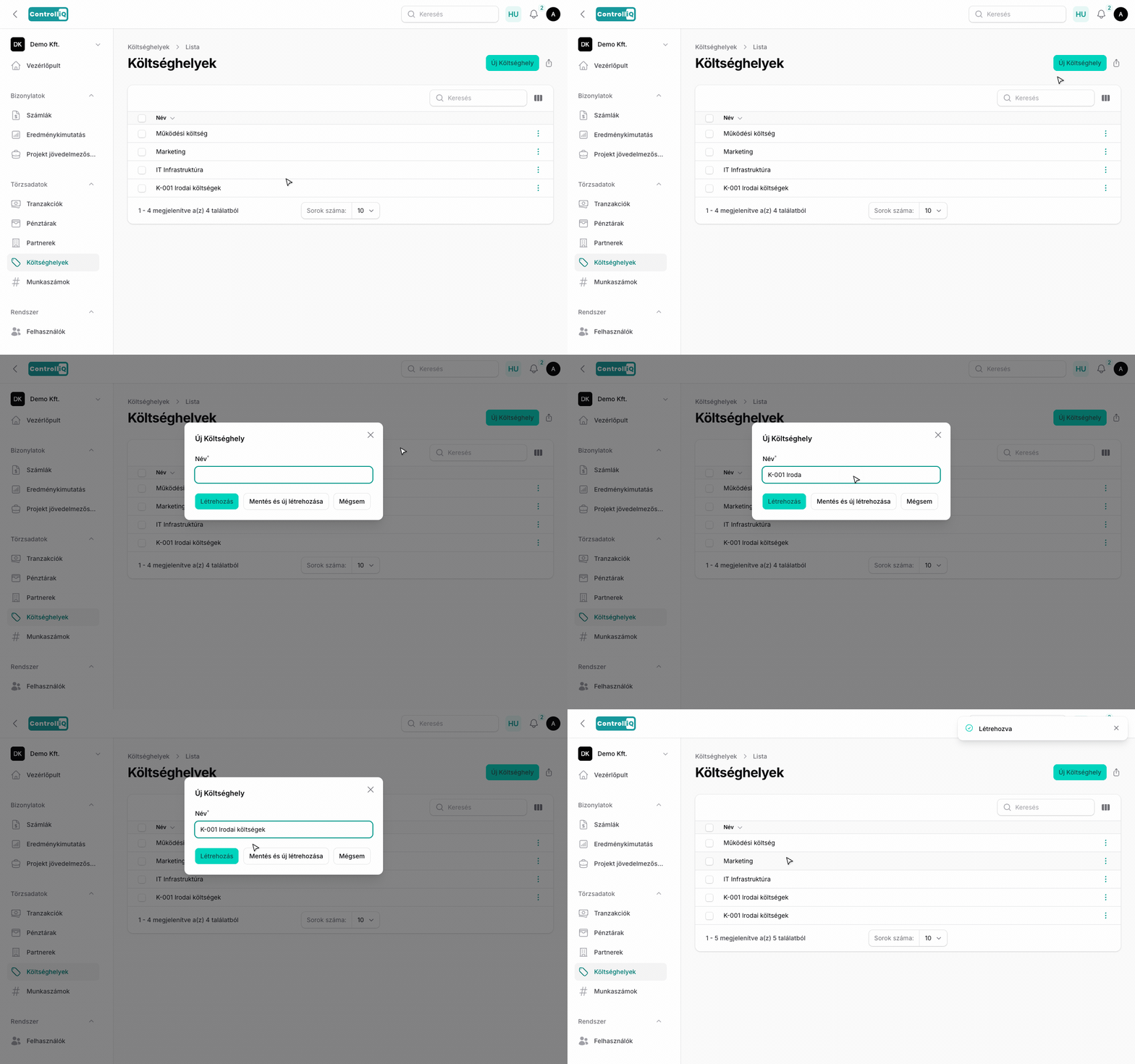
Navigálj a Törzsadatok > Költséghelyek menüpontra.
2
Kattints az Új költséghely gombra.
3
Add meg a költséghely megnevezését. Ez a mező szabadon szerkeszthető, így beleírhatsz kódot is (pl. „K-001 Irodai költségek").
4
Kattints a Létrehozás gombra.
Költséghelyek használata
A költséghelyeket a számlák kategorizálásánál használhatod. Minden számla-tételsorhoz hozzárendelhetsz egy költséghelyet, ami megjelenik a riportokban és az exportokban is.