KÉZIKÖNYV
Felhasználói Kézikönyv
Email Import / Email cím beállítása
Email cím beállítása
Email import beállítása
Minden céghez egyedi email címet biztosítunk, amelyre továbbíthatod a bejövő számlákat. A rendszer automatikusan feldolgozza a csatolt PDF számlákat.
Egyedi email cím
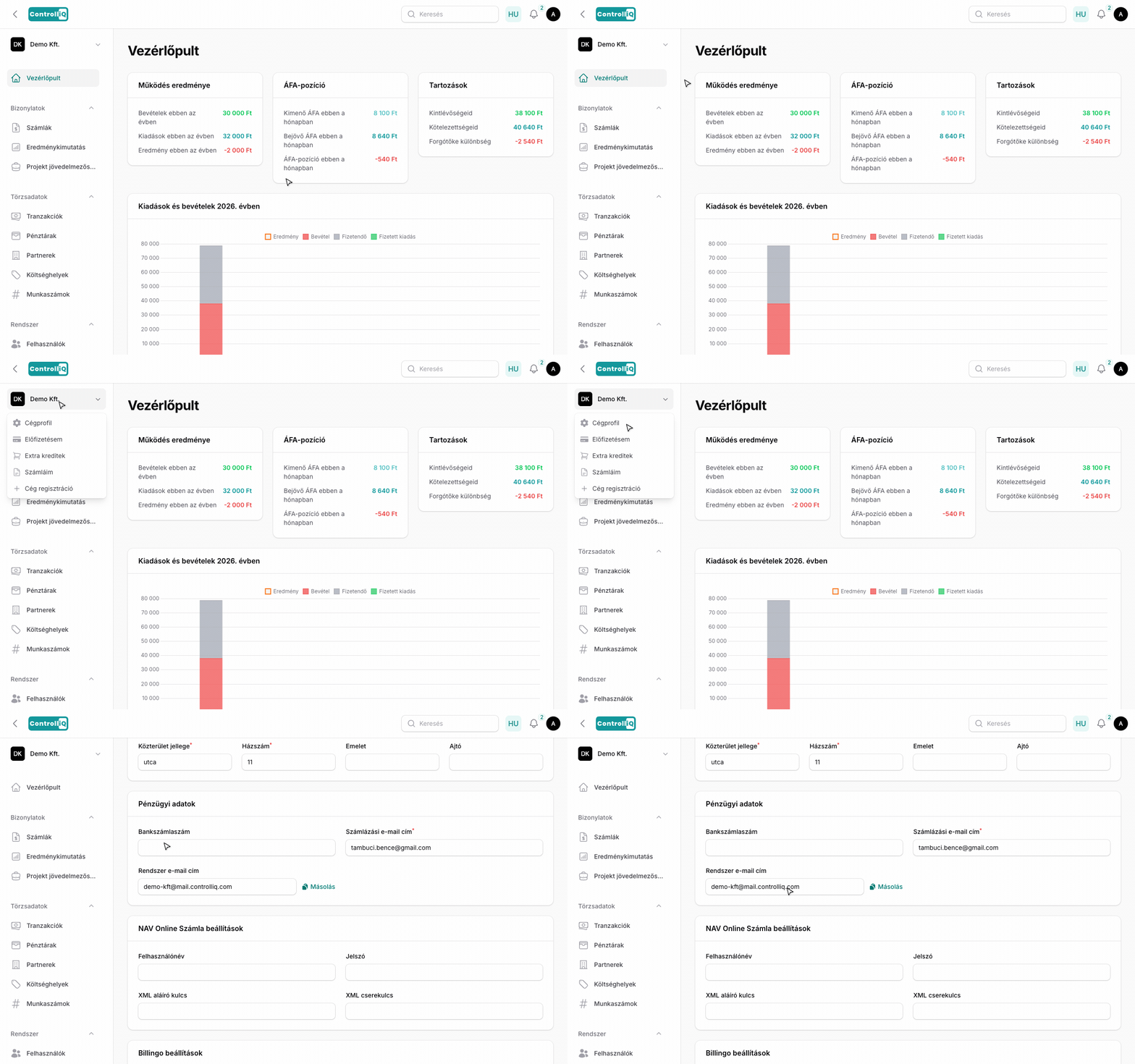
A cég egyedi import email címét két helyen találod:
•Cégprofil — A bal oldali menüben a cégnévre kattintva a legördülőben válaszd a „Cégprofil"-t. Az email cím a Pénzügyi adatok szekcióban található, a „Rendszer email cím" sor alatt.
•Számlafeltöltés — A számlák listájában a feltöltés gombra kattintva megjelenő felugró kártyán is látható az email cím.
Az email cím nem módosítható — a rendszer automatikusan generálja a cég nevéből.
Beállítás
Az email import automatikusan aktív minden cégnél. Nincs szükség külön beállításra — csak kezdd el a számlák továbbítását az egyedi email címre.