KÉZIKÖNYV
Felhasználói Kézikönyv
Egyéb Pénzügyi Tételek / Pénzügyi tételek listája
Pénzügyi tételek listája
Egyéb költségek/bevételek listája
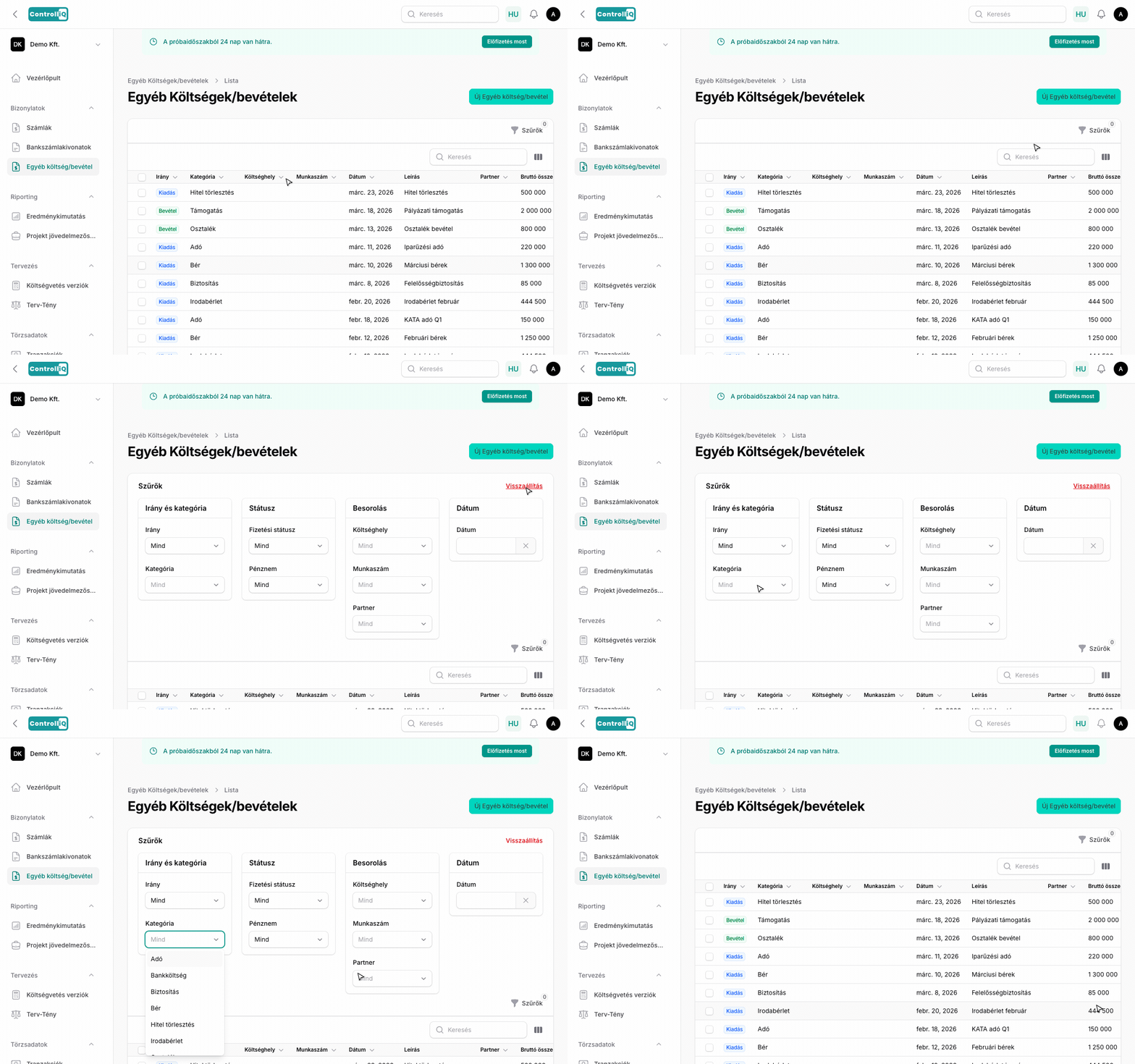
A Bizonylatok > Egyéb költség/bevétel menüpont alatt találod azokat a kiadásokat és bevételeket, amelyek nem kapcsolódnak számlához — például bérek, adók, bankköltségek, hiteltörlesztések vagy bérleti díjak.
Lista oszlopok
•Irány — Bevétel vagy Kiadás, színes jelöléssel.
•Kategória — A pénzügyi tétel kategóriája (pl. Bér, Adó, Bankköltség).
•Költséghely — A hozzárendelt költséghely.
•Munkaszám — A hozzárendelt projekt / munkaszám.
•Dátum — A tétel dátuma.
•Leírás — A tétel rövid leírása.
•Partner — A kapcsolódó partner (ha van).
•Bruttó összeg — A teljes bruttó összeg.
•Pénznem — A tétel pénzneme.
•Fizetési státusz — Mutatja, hogy a tétel ki van-e fizetve, részlegesen vagy még nincs kifizetve.
Szűrők
A szűrők 4 szekcióban érhetők el:
Irány és kategória
•Irány — Szűrés Bevétel vagy Kiadás szerint.
•Kategória — Szűrés pénzügyi tétel kategória szerint.
Státusz
•Fizetési státusz — Kifizetett, ki nem fizetett vagy részlegesen kifizetett tételek megjelenítése.
•Pénznem — Szűrés pénznem szerint.
Besorolás
•Költséghely — Szűrés költséghely alapján.
•Munkaszám — Szűrés munkaszám alapján.
•Partner — Szűrés a hozzárendelt partner szerint.
Dátum
•Dátum — Szűrés a tétel dátuma szerint.
Rendezés és lapozás
Bármelyik oszlop fejlécére kattintva rendezheted növekvő vagy csökkenő sorrendbe. A lista lapozható — az alján beállíthatod a sorok számát oldalanként.