KÉZIKÖNYV
Felhasználói Kézikönyv
Költséghelyek és Munkaszámok / Munkaszámok kezelése
Munkaszámok kezelése
Munkaszámok
A munkaszámok lehetővé teszik a projekt szintű nyomon követést. Minden munkaszám egy projektet vagy megbízást reprezentál.
Munkaszám létrehozása
1
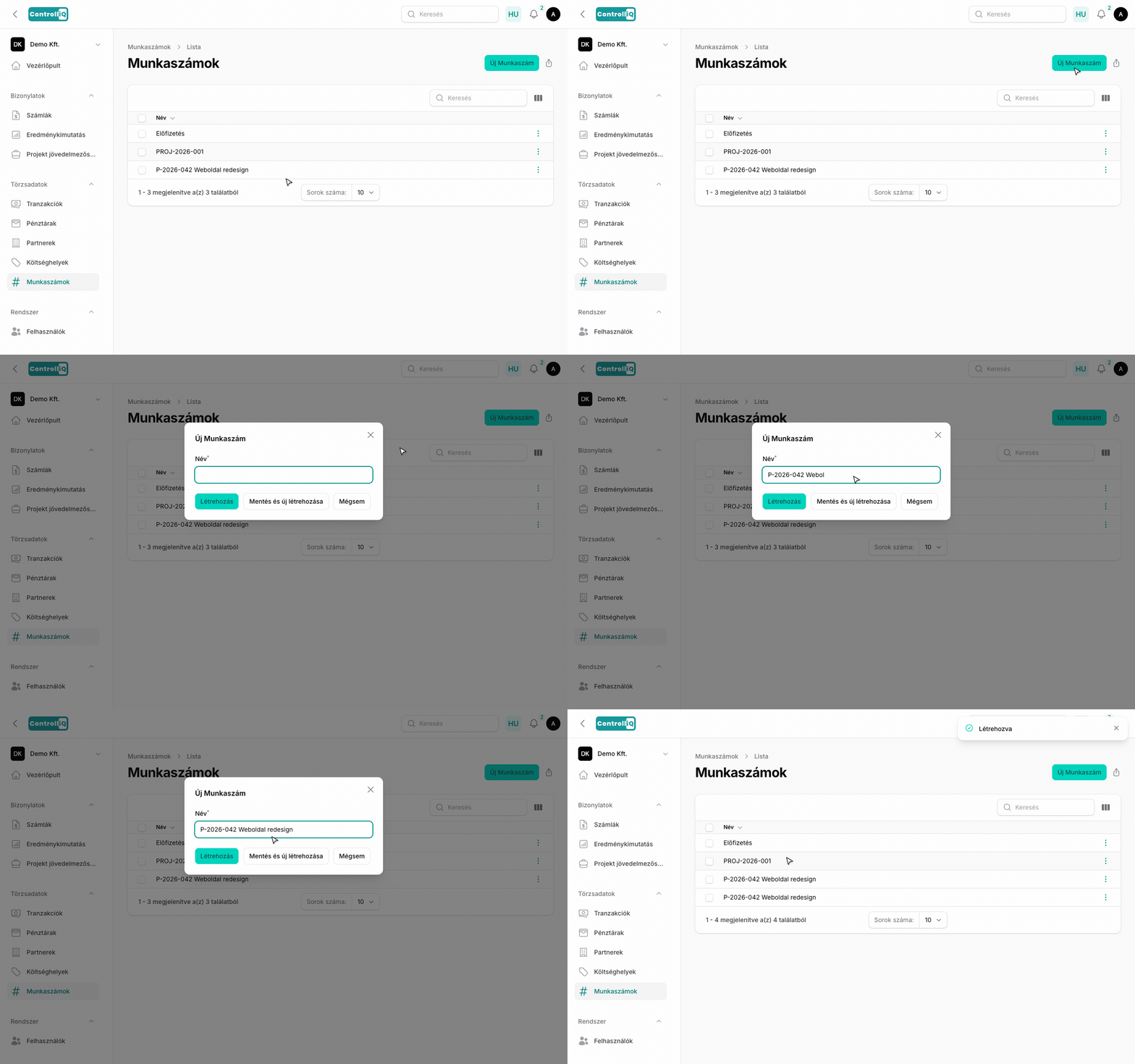
Navigálj a Törzsadatok > Munkaszámok menüpontra.
2
Kattints az Új munkaszám gombra.
3
Add meg a munkaszám megnevezését. Ez a mező szabadon szerkeszthető, így beleírhatsz kódot is (pl. „P-2026-042 Weboldal redesign").
4
Opcionálisan hozzárendelhetsz egy vagy több költséghelyet a munkaszámhoz — az így összekapcsolt költséghelyek a számláknál automatikusan hozzárendelődnek.
5
Kattints a Létrehozás gombra.
Projekt jövedelmezőség
A munkaszámokhoz rendelt bevételek és kiadások alapján a ControlliQ automatikusan számítja a projekt jövedelmezőséget. Ezt a Riportok menüben tekintheted meg.